
Digital Tile Software: Blueprinting Confidence Before Every Install
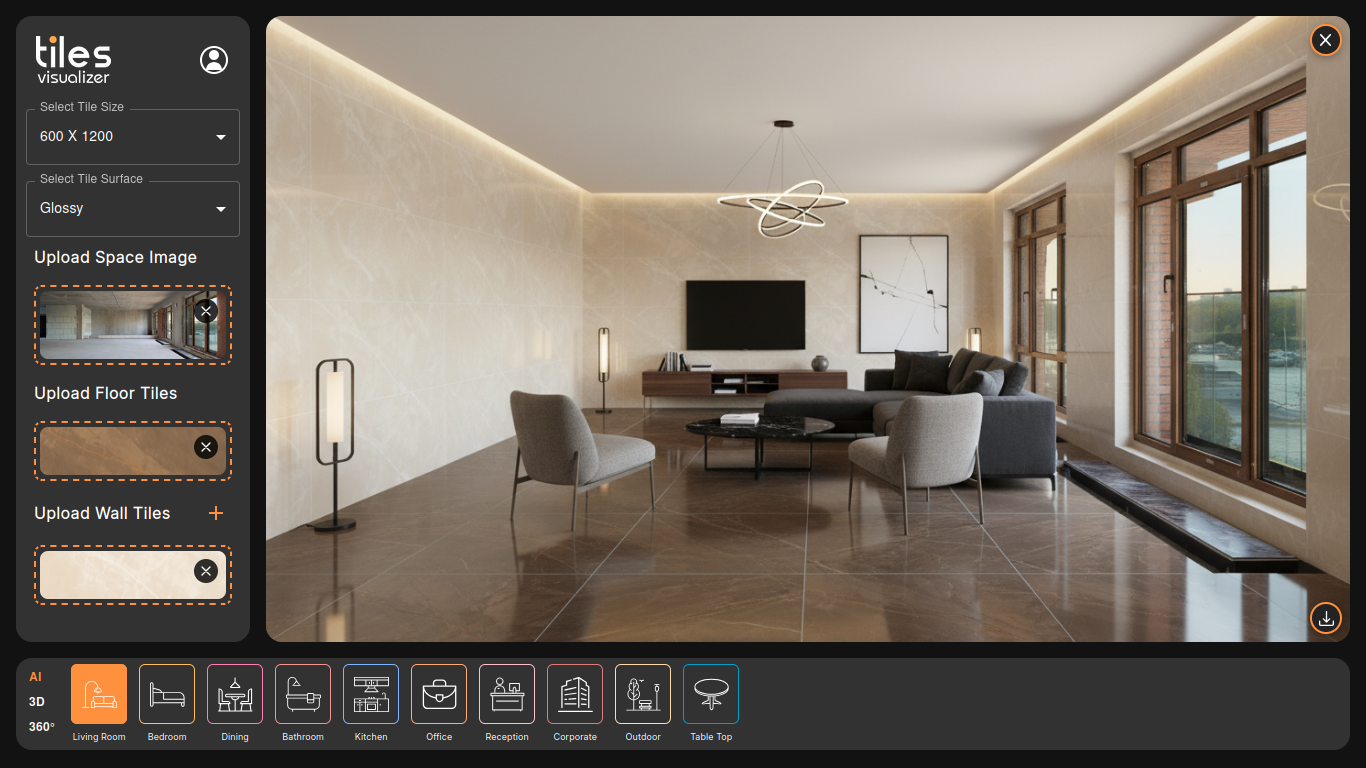
Choosing tiles is one of the most permanent decisions in any renovation. A floor tile that looks warm and neutral in a showroom can feel cold and grey under the actual lighting of your bathroom. A wall pattern that seems bold in a catalogue photo can look completely different once it wraps around a full room.
The result? Costly returns, second-guessing, delayed projects, and frustrated clients. Interior designers spend hours creating physical mood boards. Contractors lose sales because clients can't visualize the end result. Homeowners commit to expensive choices based largely on gut feeling.
Digital tile software exists to close this gap — and Tiles Visualizer does it without requiring any installation, design training, or hardware upgrade.
What Is Digital Tile Software?
Digital tile software is a browser-based tool that lets you visualize how any tile will look on a floor, wall, or entire room — before ordering, purchasing, or installing a single piece.
Unlike basic photo editing tools, modern digital tile software uses AI to understand perspective, surface texture, lighting conditions, and spatial scale. The result is a photorealistic preview that reflects how the tile will actually appear in a real space.
Tiles Visualizer takes this further by letting you either upload a photo of your own space and apply tiles directly onto it, or choose from a library of pre-built room templates and 3D models to explore ideas before you even have a space in mind. Both approaches produce a realistic, downloadable JPG — a file you can share with clients, contractors, or use as a design brief.
Who Uses Digital Tile Software?
Homeowners Planning a Renovation
If you're redoing your bathroom, kitchen, or living room flooring, digital tile software removes the guesswork. Upload a photo of your actual room and swap tile options in seconds. See how a herringbone pattern looks versus straight-lay. Test a matte finish against a glossy one. Decide confidently before you spend a rupee.
Interior Designers and Architects
Presenting concepts to clients becomes far more compelling when they can see an actual rendering of their space — not a flat catalogue image. Tiles Visualizer speeds up the approval process, reduces revision cycles, and helps clients commit faster.
Tile Retailers and Showrooms
Showroom floor space is expensive. You can't stock every tile in every setting. With digital tile software, your sales team can show customers how any tile in your catalogue looks in their home — right at the point of sale. This directly reduces returns and increases conversion.
Contractors and Builders
Before quoting a job, showing a client what the finished result could look like is a powerful sales tool. It also reduces change-of-mind situations mid-project that cost time and money.
How Tiles Visualizer Works
Step 1: Upload Your Tile Photo
Start by uploading a photo of the tile you're considering — or multiple tiles for comparison. The software reads the texture, color, and pattern with AI precision.
Step 2: Choose Your Space
You have two options here. Upload a real photo of the room you're working with — your bathroom, kitchen, hallway, or living area. Or browse the built-in templates, which include fully rendered 3D and AI-enhanced 360° scenes covering a wide range of room types and lighting conditions.
Step 3: Apply to Floor, Wall, or Both
Select whether to apply the tile to the floor, the wall, or both simultaneously. The AI maps the tile onto the correct surfaces, accounting for perspective, scale, and light — so it looks natural, not pasted-on.
Step 4: Preview and Compare
Swap between tile options instantly. Test different grout colors, layout patterns, and room configurations. There's no waiting time and no technical skills required.
Step 5: Save as JPG
When you're satisfied with a look, export the scene as a high-resolution JPG. This file is ready to share via WhatsApp, email, or in a client presentation. It serves as a visual contract — everyone on the project knows exactly what the final result should look like.
Key Features That Set Tiles Visualizer Apart
AI-Powered Surface Detection
The software intelligently detects floors and walls in uploaded photos, so you don't have to manually mask or outline surfaces. Just upload and apply.
360° Room Models
The built-in templates aren't flat images — they're fully rendered 3D environments. This means you can see how tiles transition across a corner, how light hits a textured surface, and how the entire room feels.
No Installation Required
Tiles Visualizer runs entirely in the browser. There's nothing to install, and it works on any device with a modern browser — desktop, tablet, or phone.
JPG Export
The downloadable preview is high-resolution and photorealistic — not a rough mockup. It's usable in client presentations, project documentation, and sales pitches.
Reduced Manual Labor
Traditional visualization workflows involve physical samples, manual mockups in Photoshop, or expensive rendering software. Tiles Visualizer compresses a process that used to take hours into something that takes minutes — reducing manual effort significantly for designers and sales teams alike.
Real Scenarios Where This Software Saves Time and Money
The Uncertain Homeowner
A homeowner is renovating their master bathroom and has narrowed it down to two floor tiles but can't decide. Instead of ordering samples and waiting for delivery, they upload photos of both tiles and their bathroom into Tiles Visualizer. In under five minutes, they have two realistic previews showing exactly how each tile looks in their actual bathroom. Decision made.
The Busy Designer
An interior designer managing four projects simultaneously has a client who keeps changing their mind on kitchen backsplash tiles. Using Tiles Visualizer, the designer prepares five different tile visualizations on the client's actual kitchen photo in a single session and sends them across. The client picks one. No more back-and-forth.
The Tile Retailer Closing a Sale
A couple walks into a showroom interested in a large-format marble-look porcelain for their living room. The salesperson opens Tiles Visualizer, uploads the tile texture onto a photo of their living room, and shows a realistic preview within minutes. Confidence is high. Sale is closed.
Frequently Asked Questions
Do I need to create an account to use Tiles Visualizer?
You can start exploring and previewing tiles right away at ai.tilepreview.com with no setup required.
Can I visualize tiles on both walls and floors at the same time?
Yes. The software lets you apply tiles to floors, walls, or both simultaneously within the same scene.
Is this software suitable for commercial spaces, not just homes?
Absolutely. You can upload photos of any space — office lobbies, retail floors, hotel bathrooms, and more. The templates also include commercial and hospitality settings.
Does digital tile software replace the need for physical samples?
It significantly reduces the reliance on physical samples. Most users narrow their choices down to one or two options using the software, then order only those targeted samples for final confirmation.
What photo formats can I upload for my room?
You can upload standard image format of JPG. The clearer and better-lit your room photo, the more realistic the tile preview will be.
Start Visualizing Today
Whether you're a homeowner who doesn't want to gamble on a permanent design decision, a designer who needs faster client approvals, or a retailer looking to close more sales with less friction — Tiles Visualizer gives you the confidence to commit before a single tile is laid.